Hello! Been using this amazing app a while and now I'm trying to make a universal "cast url to TV" system. The plan: when someone sends a "youtu" or a "twitch" etc link to a specific chat app on the TV, automation will read the notification and open the url that is the text of that notification.
Trigger:
- if that app's notification description text contains e.g. "youtu" (youtube.com, youtu.be etc)
(This works, temporarily verified with an action that opens a random app.)
Action:
(following the "Open a webpage" example: https://server47.de/automation/examples.html )
- Start another Program
- by action
- by startActivity()
- activity/action name: android.intent.action.VIEW
- Parameter Type: URI
- Parameter Name: IntentData
- Parameter Value: [notificationText]
- Press Add Intent Pair, Save.
The rule gets triggered, but doesn't work. I also tried with www.youtube.com instead of [notificationText], to debug, no response besides the toast message of starting the rule.
Not sure how to proceed. Perhaps as a last resort, if this method doesn't work, how could I do the equivalent by starting e.g. the NewPipe app and send it the url as a command?
Thanks!!
PS: running on Android 11
Can't seem to open urls
Re: Can't seem to open urls
Thank you for bringing this up. It was a combination of two things. The example was outdated; I have updated it to match the newer configuration screen. The second issue was and error in the code. I have fixed it. I plan to release it until the end of the year.
Re: Can't seem to open urls
Hey are you SURE you've tested things? I came back to it today, I saw and installed your Fdroid update from 2025-12-27, but it's still impossible to do this no matter how I try.
1. The images in your configuration example webpage (https://server47.de/automation/examples.html), under "Open a webpage", seem to still be the same old android ui so I don't think you changed them:
- https://server47.de/automation/images/e ... owser1.png
- https://server47.de/automation/images/e ... owser2.png
2. Here's what I'm doing:
2.a. Try to open a url which is the [notificationText]:


Or,
2.b. To debug, just try to open a simple static url: www.youtube.com

In both cases, Automation says "Activating Rule ..." in a toast message. But then nothing happens. And I don't know how to debug further.
I tried this on 2 devices both running Android 11, on which Automation works for other non-url purposes (automation is able to simply open other apps).
1. The images in your configuration example webpage (https://server47.de/automation/examples.html), under "Open a webpage", seem to still be the same old android ui so I don't think you changed them:
- https://server47.de/automation/images/e ... owser1.png
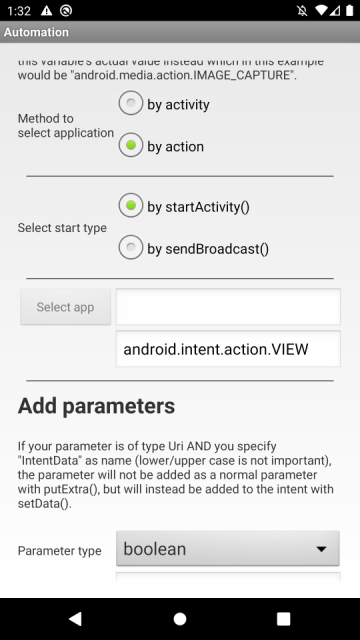
- https://server47.de/automation/images/e ... owser2.png
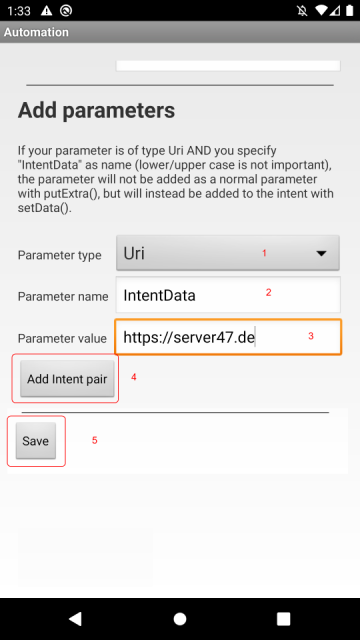
2. Here's what I'm doing:
2.a. Try to open a url which is the [notificationText]:
Or,
2.b. To debug, just try to open a simple static url: www.youtube.com
In both cases, Automation says "Activating Rule ..." in a toast message. But then nothing happens. And I don't know how to debug further.
I tried this on 2 devices both running Android 11, on which Automation works for other non-url purposes (automation is able to simply open other apps).
Re: Can't seem to open urls
When using static URLs it looks like you must include the protocol in the URL, so start with http or https.
As for the one with the variable I've found a bug that will be fixed in v1.8.5.
As for the one with the variable I've found a bug that will be fixed in v1.8.5.
Re: Can't seem to open urls
Hello yet again. I tried again today. Looked at the updated "Open a Webpage" example. There are 2 problems:
1. If you put only [notificationText] in the "Parameter Value" field, it doesn't work. Probably because it sees "[noti" instead of "https" even though the contents of the variable START WITH "https".
When I put "https[notificationText]" in the "Parameter Value" field - it works, it opens the browser, but obviously the httpshttps://youtube.com URL doesn't work.
2. The action's trigger always works accurately: I ask it to only trigger if the incoming notification includes "youtu".
HOWEVER, the [notificationText] variable from the triggered action, is hit and miss:
- sometimes it prints "1+notification"
- sometimes it prints the contents of a random older notification from the same chat app.
- if i manually clear all notifications, then it sometimes prints the intended youtu link message, and sometimes "1 notification"
Android 11.
1. If you put only [notificationText] in the "Parameter Value" field, it doesn't work. Probably because it sees "[noti" instead of "https" even though the contents of the variable START WITH "https".
When I put "https[notificationText]" in the "Parameter Value" field - it works, it opens the browser, but obviously the httpshttps://youtube.com URL doesn't work.
2. The action's trigger always works accurately: I ask it to only trigger if the incoming notification includes "youtu".
HOWEVER, the [notificationText] variable from the triggered action, is hit and miss:
- sometimes it prints "1+notification"
- sometimes it prints the contents of a random older notification from the same chat app.
- if i manually clear all notifications, then it sometimes prints the intended youtu link message, and sometimes "1 notification"
Android 11.